
Choosing the markups (addons) to use for the estimate
Copying an estimate addon to the standard database
Creating an addon for this estimate only
Insert Addon window
This window presents a list of standard database addons so you can choose the markups you want to include in the estimate.
Sage Estimating (SQL) inserts the selected addon above your current position.
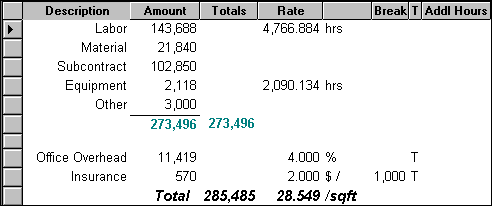
Where you insert each addon determines which estimate costs are used to calculate the addon amount. Consequently, an addon should come after the subtotals and other addons you want to include. This is especially important for addons based on subtotals. Example
To open the Insert Addon window, click  in the Totals
window.
in the Totals
window.
For more information, click  on the title bar of the window, and then click a field or button.
Tips:
- To insert the selected addon, click [Select].
- You can insert several addons before closing the window.
- Any changes you make to an addon in the Totals window apply to this estimate only.
- You can hover the cursor over an addon description to view information about the addon. This enables you to see the contents of the addon without having to open it.
- You can click and addon from this window and drag it to an open Totals window.
-
You can insert the same addon several times and customize each one for the current estimate. Example
Example: If there is a general Overhead addon in the standard database, you could insert it twice

and customize each one for this estimate.
