
Estimate List window
Use this window to select an estimate to open. Select the estimate you want to open from the list and click [OK] or double-click on an estimate to open it.
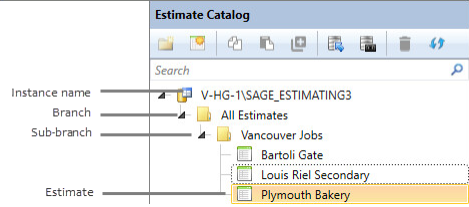
Estimates listed in the My Estimates pane are organized according to estimate database "branches" and sub-branches. You create or specify a branch at the time you create an estimate.
Notes:
- The branch is displayed for organizational purposes only. While you can branch and organize your estimates as necessary, your estimates are all stored in the same estimate database.
- You need to have the appropriate permissions to create new estimates. If you are unable to create a new estimate, contact your system administrator to have the appropriate permissions assigned.
Click the arrow key to the left of any branch name to display its sub-branches and estimates.
You can view a list of the most recently opened estimates in the Most Recent Estimates pane. Use this list to locate and open your most commonly used estimates quickly.