Item Tables command

Use this command to create and edit the individual item tables in the standard database.

On the ribbon, from the Elements group on the Data tab, click Item Tables.

In the Database Item Table window that window opens, set up the criteria for returning the correct item to an assembly during takeoff. Example
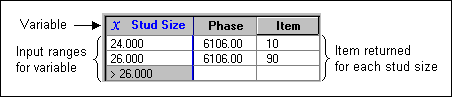
Example: You could set up an item table to return the appropriate stud to an assembly based on the variable that asks about the stud size at takeoff.

An item table with input ranges for a variable stud size and the phase and item returned for each stud size

Notes:  

  • Item Tables is available only if a standard database is open.

  • The Edit Item Tables command is also available from the shortcut menu for an item table in the Assembly window.

    Shortcut menus provide access to commands that you may need to accomplish a particular task.

    To open a shortcut menu, point to something in a Sage Estimating (SQL) window, and then right-click it. The available commands vary based on where you are pointing.