An item with no amount in any category Pound signs A lump sum An unused category An empty cell that requires an entry An item with no amount in any category A value with a pending adjustment An item with no amount in any category
Learn more

Shortcut menu

Special indicators in the spreadsheet

Sage Estimating (SQL) uses symbols, fonts, and background color to indicate unusual conditions for numeric values in the spreadsheet. For details, move the pointer over the image below and click when the pointer turns into a hand.
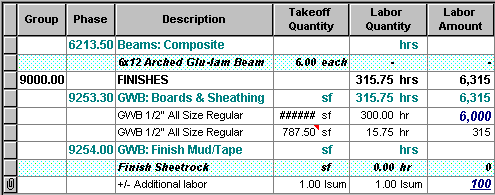
An image with hot spots showing special indicators in the spreadsheet

Tips:  

  • Use the Options command to specify a font and background color for lump amounts or for items with a total of zero.
  • The shortcut menu offers commands that allow you to change the column width.

    Shortcut menus provide access to commands that you may need to accomplish a particular task.

    To open a shortcut menu, point to something in a Sage Estimating (SQL) window, and then right-click it. The available commands vary based on where you are pointing.