
Estimates grid
The Estimates grid appears in the Manage Estimates window in Estimating and in the Estimates pane in the Estimating Management Console when you select a branch, such as All Estimates in the Estimate Catalog. All estimates associated with that branch appear in the grid.
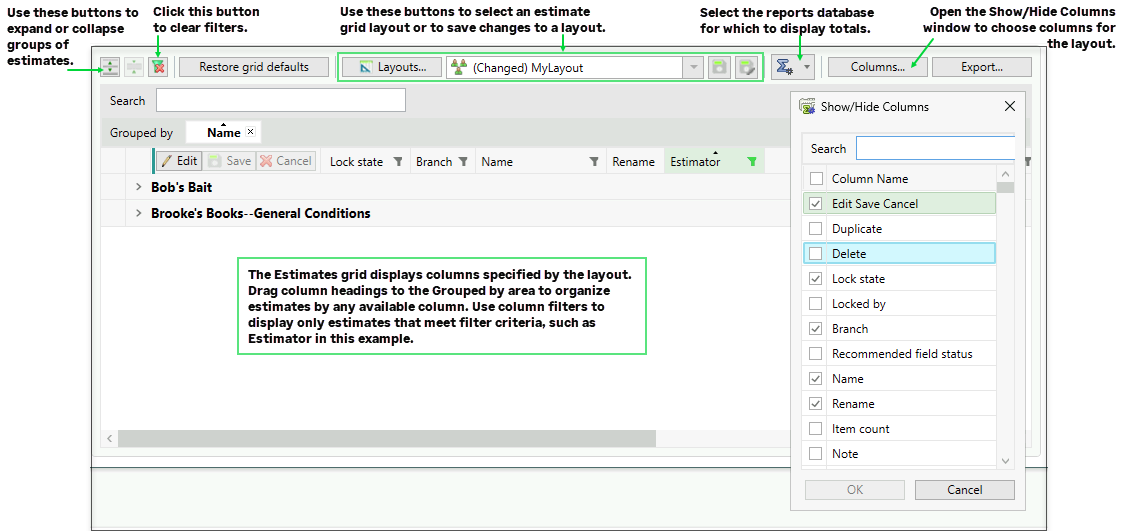
Depending on your permissions and the columns shown in the grid, you can also check out estimates, edit supported estimate information, save or cancel changes, rename estimates, and delete estimates directly from the grid.
You can also:
-
Export the contents of this grid to an Excel file.
-
Customize the grid by showing or hiding columns.
Note: If the Estimate Grid Totals Source option is selected for at least one external report database configuration, additional totals columns are available for you to add to the grid.
-
Filter the display to show only estimates that match selected criteria.
-
Search for estimates by name.
-
Sort, group, and search-highlight address book-related columns by the displayed names.
-
Use extended selection and spreadsheet-like right-click behavior when working with grid cells.
Items in this window
| Button | Notes |
|---|---|
| [Columns] |
Click to open the Show/Hide Columns window where you can select the columns you want to display. Branch-level columns move together when you drag them to a different location. |
| Edit, Save, and Cancel |
Use these commands to check out estimates for editing, save modified estimates, or cancel changes. The Edit, Save, and Cancel columns are displayed by default on the left of the grid. |
| Delete |
Deletes the selected estimate from the grid. The estimate row is removed after the estimate is deleted. This column is not displayed by default. You can add it to the grid using the Show/Hide Columns window. |
| Rename |
Renames the selected estimate. You can use the rename column or right-click the row header and then select the rename command. |
| [Export] |
Click to export the contents of the Estimates grid as an Excel (XLSX) file. You can choose to view the Excel file immediately after exporting the data. |
|
(Filter Off/On) |
Click the funnel icon in the header of any column you want to use to filter estimates. If filtering hides an estimate that is currently checked out, a banner appears above the grid. When you click the icon, a dialog box opens where you specify filter criteria. For example, if you click the icon for the Estimator column, you can select the name of an estimator, blank estimator names, or estimator names that match criteria. After you apply a filter, the funnel icon turns blue. To turn the filter off, display the filter dialog again, and then clear the criteria. |

(Layouts) |
Click to open the Edit Estimate Grid Layouts window, where you can view a list of existing layouts or add a new layout. You also use the window to rename, duplicate, or remove an existing grid layout. |

(Layout selection list) |
Select an existing layout from this list to apply it to the estimates grid. |
| [Restore grid defaults] |
Click to restore the visible columns to the factory settings. |

(Save the layout) |
This button is available after you make changes to the current layout. Click it to save your changes to the current layout. |

(Save the layout as) |
Click this button to save the current layout with a different name. Clicking it opens a separate Save Estimate Grid Layout window, where you can enter a name for the new layout and choose whether to share it or keep it personal. |

(Set totals external reports database) |
Click this button to select the external reports database from which you want to display totals in the estimates grid. Note: You need to have generated an external reports database before you can select one, |
 / /  (Sort Ascending/ Descending) |
To sort by a column, click the column header. Assuming that you have not yet sorted by the column:
|
 /
/
| Field | Notes |
|---|---|
| <columns> (various) |
The columns that you choose to show (using the Show/Hide Columns window) appear in the Estimates grid. You can use buttons in the column headers to filter and sort the grid in ascending or descending order. You can change editable columns when the estimate is checked out. Some columns, including Factor table, Labor rate table, Equipment rate table, Crew price method, Reporting hours, Estimator, Project Type, and some user-defined job class fields, are not editable in the grid. |
 Lock State Lock State |
A pencil icon in this column indicates whether an estimate is locked exclusively for a user who is editing it. |
| Search |
Type keywords in the Search box to display only estimates with names that match the search term. Matching text is highlighted in supported columns, including address book-related columns. |