
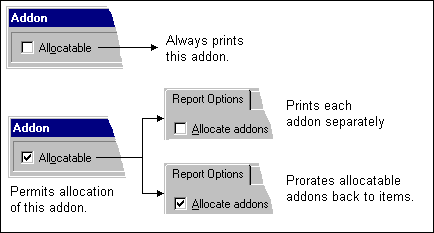
Allocating addons is a way to incorporate the cost of certain addons without affecting the bottom line of your estimate. You can allocate, or prorate, addons when you print reports or generate transactions to job cost. The costs remain part of the estimate but are prorated among the appropriate items instead of appearing as separate totals. Prorated amounts show in the Addon Amount spreadsheet column for each associated item.
To allocate addons on reports and in job cost:
-
On the ribbon, from the Other Pricing group on the Data tab, click Addons.
-
For each addon you want to allocate, select Allocatable in the Addon window.
-
Before generating transactions to a job cost application, select Allocate addons? in Step 2 of the Job Cost Transfer wizard.
-
On the ribbon, from the group on the tab, click , , or .
-
-
Before printing a report, select Allocate addons in the Report Options window.
On the ribbon, on the tab, click , and then click [].
Tip: To view the allocated calculation for an addon amount, select Show Addon Detail from the shortcut menu.