
Learn more
Tips for filling in the formula table
Changing the conditions for a formula table
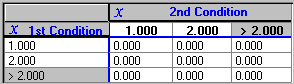
Enter the conditions, input ranges, and values to be returned to the formula.
The configuration of the grid depends on whether you select the One dimensional or Two dimensional option.
Click the image below for details.
Tips:
- To insert a new row, select a cell in the grid, and then click [Insert Row] to insert the new row above your current position.
- To insert a column, select a cell in the grid, and then click [Insert Column].
- A red background means that the cell requires an entry.